> For the complete documentation index, see [llms.txt](https://docs.mineunivers.com/llms.txt). Markdown versions of documentation pages are available by appending `.md` to page URLs; this page is available as [Markdown](https://docs.mineunivers.com/modalidades/survival-op/clanes.md).
# Clanes
Guia de como funciona el sistema de clanes
#### Hola comunidad de MineUnivers
\
En la siguiente guía podrán aprender sobre el sistema de Clanes\
que esta implementado en Survival OP y BoxPvp, Gens.\
\
Lo primero, puedes unirte a un clan con **/clan join \**\ **Requiere ser invitado por el líder del clan**\
\
Puedes crear tu propio clan con el comando **/clan create \**\ **Requiere rango Usuario**\
\
\
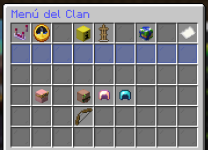
Una vez dentro de un clan, puedes interactuar con el comando **/clan**.\
Al usar el comando se te abrirá el menú interactivo.\
\
[](https://foro.minelibre.es/attachments/captura-de-pantalla-2023-10-27-181026-png.68/)\
\ **En el menú tendrás opciones como:**
\
**Ajustes del Cla****n** (Lider)\ **Registros del Clan** (Lider)\ **Estandarte del Clan** (Lider)\
\
Estadísticas del Clan (Miembro)\
Lista de todos los Clanes (Miembro)\
Misiones del Clan (Miembro)\
Miembros del Clan (Miembro)\
Hogares del Clan (Miembro)\
\ Según tu rol en el clan, tendrás permisos a distintas opciones.\
\
Concluyendo..\
El menú es bastante intuitivo y fácil de usar así que no daremos mas explicaciones.\
Sin embargo, abajo les dejaremos una sección de preguntas frecuentes para que puedan leerlas.\
####  >>PREGUNTAS FRECUENTES<<
\
**Como invito a un usuario a mi clan?**\
Con el comando /clan member invite \\
**Como expulso a un miembro del clan?**\
Con el comando /clan member kick \\
**Como asciendo a rol moderador a un miembro?**\
Con el comando /clan promote \ moderator\
**Como desciendo al rol miembro a un moderador?**\
Con el comando /clan demote \\
**Como cambio el tag de mi clan?**\
Con el comando /clan modtag \\ Puedes usar formatos y colores tradicionales de Minecraft!\
\
**Puedo usar colores RGB o degradados en el tag?**\
Si, la manera mas fácil de hacerlo es copiando el comando de abajo:\ /clan modtag \**nuevoTAG**\\ **Ejemplo:** /clan modtag \LugenzArmy\\
\
**Puedo usar colores RGB/Degradados y negrita en el tag?**\
Si, la manera mas fácil de hacerlo es copiando el comando de abajo:\ /clan modtag \\**nuevoTAG**\\\ **Ejemplo:** /clan modtag \\LugenzArmy\\\
**Como elimino para siempre mi clan?**\
Con el comando /clan disband\
\
\
Eso es todo, si tienen otras preguntas mas especificas, pueden contactar un staff en el [Discord](https://discord.mineunivers.com/)\
Esperamos que la guía les sea de mucha ayuda.
---
# Agent Instructions
This documentation is published with GitBook. GitBook is the documentation platform designed so that both humans and AI agents can read, navigate, and reason over technical content effectively. Learn more at gitbook.com.
## Querying This Documentation
If you need additional information that is not directly available in this page, you can query the documentation dynamically by asking a question.
Perform an HTTP GET request on the current page URL with the `ask` query parameter, and the optional `goal` query parameter:
```
GET https://docs.mineunivers.com/modalidades/survival-op/clanes.md?ask=&goal=
```
`ask` is the immediate question: it should be specific, self-contained, and written in natural language.
`goal` is optional and describes the broader end goal you are ultimately trying to accomplish on behalf of the user. GitBook uses it to tailor the answer towards what is most useful for that goal.
The response will contain a direct answer to the question and relevant excerpts and sources from the documentation.
Use this mechanism when the answer is not explicitly present in the current page, you need clarification or additional context, or you want to retrieve related documentation sections.